As powerful as ImageCast can be, sometimes a project is so
simple that an enterprise solution is simply overkill. At
times like this, using the ImageCast Client Program in
Standalone Mode can be advantageous. It is especially
useful when backing up a single system.
 Using the right tool for the job?
The Standalone Client is useful for machines that are
not connected to the network. ImageCast is designed to
create a Client that can restore Images from CD-ROM, among
other types of media.
Some scenarios require the Standalone Client,
such as when a multi-part Image is to be restored from
removable read/write media, like Iomega Zip® or SyQuest®
cartridges. The Standalone Client can both create and
restore multi-part Images by generating the image directly
on the media or by specifying a fixed size for each
image-part. This feature is quite helpful when creating
larger (>650MB) Images to be put on CD-R discs.
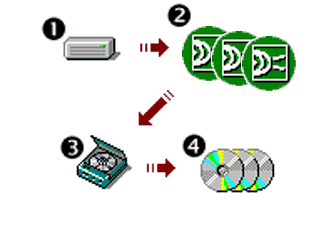
Example of splitting an image to make a set of CD-R
discs:
(1) With 1500 MB (1.46 GB) used, image the hard disk using
the /SPLIT=650 option
(2) The result is a three-part set: two files with 650 MB
and one file with 200 MB of the total Image.
(3) Burn each file to a single CD-R, where the third part
(200 MB) allows room for additional files.
(4) Voila! A 3-CD set for one Image.
In Standalone Mode, the Client Program is powerful and
flexible. It reads FAT16, FAT32, NTFS and even Linux EXT2
partitions in their native format. Features such as data
compression, password protection and single-partition
imaging are all supported. Add to these the ability to
span read/write media, transfer Images across any
mapped-drive network connection, and copying from one hard
disk to another over a USB connection, and you have one
versatile tool.
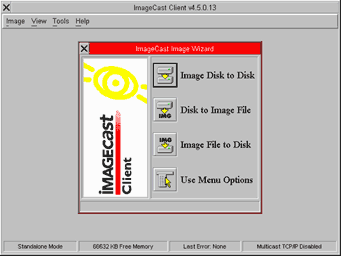
Shown here is a picture of the Standalone Client screen
with the ImageCast Image Wizard displayed.
The Client Program features a Graphical User Interface
and supports serial and PS/2 pointing devices. Custom
drivers for pointing devices are supported in the ClientBuilder
application, which also includes support for a number of
popular network adapter plug-in cards.
When used in tandem with the Control Console and/or
PostConfig Injector utility, you can automatically
customize the settings of your Microsoft-based
workstations through Post Configuration Settings. Using
the Image Wizard, a Post Configuration file can be added
at the onset of restoring an Image. With PostConfig
Injector included in the Image, the workstation will
reconfigure itself automatically upon its first boot of
the restored Windows system.
The menus available in the Client Program are shown
below; they should give you an idea of the available
features. For detailed descriptions of these, be sure to
consult the ImageCast Users Manual (in print, and on the
ImageCast CD-ROM).
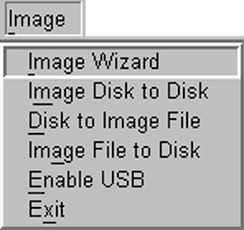
Image Menu
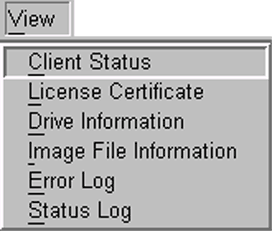
View Menu
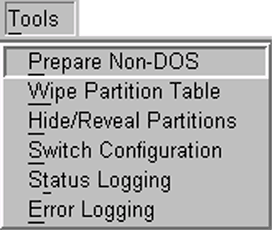
Tools Menu
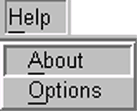
Help Menu
For single-machine projects, the Standalone Client is
truly complete; it can restore and adapt to different
hard-disk sizes and allows inclusion of Post Configuration
settings to quickly reconfigure a cloned workstation.
|