Establishing a standard platform, even in the small
enterprise, can be an almost insurmountable task using
conventional methods. You are probably familiar with
conventional deployment techniques and the great
investment of time and planning that they require. If an
exception occurs during the deployment process, you
typically end up having to start all over again, doing
your best to correct whatever problem caused the failure.
It can be a real nightmare.
ImageCast is the light at the end of this dark
tunnel, featuring quick, reliable and cost-efficient
deployment using imaging and multicast technologies. The
term multicast means that the network delivers the
same data to multiple machines all at the same time,
rather than one by one, like conventional network
applications. You can deploy dozens of machines in just
minutes, unlike older methods that took hours or days.
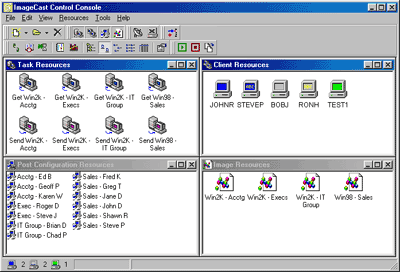
Shown here is a picture of the four-panel Control Console;
the four resource windows can be seen at a glance. You
control all multicast imaging right from this screen.
The Control Console centralizes the deployment process
and helps to control the resources involved when managing
your enterprise.
 Clients are workstations running the ImageCast Client
Program in Multicast Mode. As the workstations are
discovered by the Control Console, Client Objects
will appear. An icon in blue represents a Client that is
ready to send and receive Image data, other colors and
appearances mean specific things about each Client. (see
the Users Manual for details)
Clients are workstations running the ImageCast Client
Program in Multicast Mode. As the workstations are
discovered by the Control Console, Client Objects
will appear. An icon in blue represents a Client that is
ready to send and receive Image data, other colors and
appearances mean specific things about each Client. (see
the Users Manual for details)
 To create or restore Images, create and define Task
Objects. Task Objects come in three types: Gather,
to create an Image from a workstation; Distribute,
to send an Image to one or more workstations; Application
Deployment, to send an executable file (typically a
setup application to another ImageCast counterpart called
the System Agent (see Workstation
Utilities).
To create or restore Images, create and define Task
Objects. Task Objects come in three types: Gather,
to create an Image from a workstation; Distribute,
to send an Image to one or more workstations; Application
Deployment, to send an executable file (typically a
setup application to another ImageCast counterpart called
the System Agent (see Workstation
Utilities).
 Once the Control Console discovers a Client and gathers an
Image from it, an Image Object icon appears.
Each icon represents one Image, no matter
where the file is actually located. Each Image Object will
appear with a default label and you can easily change this
description to one that suits your organizational style.
Once the Control Console discovers a Client and gathers an
Image from it, an Image Object icon appears.
Each icon represents one Image, no matter
where the file is actually located. Each Image Object will
appear with a default label and you can easily change this
description to one that suits your organizational style.
 Lastly, there are Post Configuration Objects
which represent specific settings on workstations restored
from an Image. These icons each represent a
reconfiguration for a single workstation. Only Microsoft
platforms can benefit from this feature at this time. You
can modify common settings for Windows95™, Windows98™,
Windows NT™ 4.0 and Windows 2000™.
Lastly, there are Post Configuration Objects
which represent specific settings on workstations restored
from an Image. These icons each represent a
reconfiguration for a single workstation. Only Microsoft
platforms can benefit from this feature at this time. You
can modify common settings for Windows95™, Windows98™,
Windows NT™ 4.0 and Windows 2000™.
Applying Post Configuration Settings requires inclusion
of the PostConfig Injector utility, which
can be readily installed from the ImageCast CD-ROM (see Workstation
Utilities). The PostConfig Injector makes selected
changes; it starts automatically upon the first boot after
the Image is restored, then applies the new configuration
and removes itself from the system. The result is a fully
operational workstation that can log on the existing
network without delay.
Windows NT and Windows 2000 Images are handled with
ease; ImageCast can automatically change the Security
Identifier, or "SID," and includes support
for the Microsoft System Preparation Tool™. The
“SysPrep” tool was developed by Microsoft to resolve
the dilemma presented by imaging technologies—how to
preserve the nature of a Windows system gathered and
distributed to other machines without undergoing Windows
Setup. With SysPrep, full support for imaged systems, as
well as base-install systems, is possible.
StorageSoft PXE Server is cutting-edge
technology that works in cooperation with emerging
networking standards. With it, any TCP/IP network
that also uses DHCP services can make valuable diagnostics
and management tools available at PXE-enabled
workstations, without the need for a diskette! The
Control Console takes full advantage of PXE Services once
they are established; a proper implementation can mean the
end of using diskettes to perform imaging.
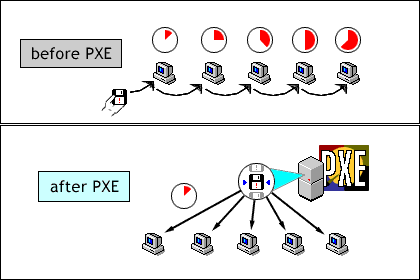
With the StorageSoft PXE Server, you no longer have to
carry around all those valuable DOS utilities on diskette;
the PXE Server can hold a complete library of “boot
images” for use on any workstation equipped with the PXE
boot ROM (a chip installed on the network adapter plug-in
card).
ImageCast doesn't stop at deploying new systems. With
advanced features like Application Packaging,
Disk-Management features, and remote management functions
of System Agent, ImageCast will become an essential
resource for meeting all of your mission-critical IT
goals.
|