| Voice
800.860.2376
937.676.2376 Fax
937.676.2478
The Different CD Types
The following white paper is from Cinram Inc. and used by
permission by CD Solutions, Inc..

Introduction
Since its introduction in the early 1980's, the compact disc
has become the chosen format for millions of music listeners.
Due to its digital recording, the fidelity produced is of the
highest quality and the disc itself is near indestructible. The
same technology makes the CD an attractive medium for
transporting other types of digital information. Not only are
compact discs extremely reliable but large quantities can be
reproduced quickly and inexpensively.
Because of the phenomenal growth of CDs and technology as a
whole, new CD formats have evolved and been defined. The basic CD
standards and principles are defined in the Red Book (audio),
Yellow Book (CD ROM), Orange Book (CD-R), and Green Book (CD-I).
All other technologies, whether an official standard or not, are
derived from the principles defined in these original industry
books.
Most new formats are being introduced as a
"multi-media" solution. Multimedia is simply a blend
of media types: audio, text, graphics, and/or video that is
being delivered all on one medium. Multimedia is important
because it allows us to mix what can be considered as separate
and distinct media or one medium. Information can be combined
from various sources: books, films, periodicals, LPs, cassettes,
computer software, etc. Record companies can produce CDs that
not only contain audio recordings, but can also include
animation, graphics, text, and video that further complements
the artistic expression and adds additional consumer value. The
consumer may choose to use all in combination or only a chosen
part. It is from this direction that the formats discussed in
this paper originate. There are many variables and
considerations in introducing a new CD format, i.e., hardware
(players), software, market demand, etc.. This paper attempts to
discuss the various formats in CD technology, with the
advantages, disadvantages and the requirements of each. The
compact disc formats that will be discussed are as follows:
Mixed Mode, Hidden Track, Stamped Multisession (CD-Extra), CD-I,
and CD+G.
Mixed Mode CD
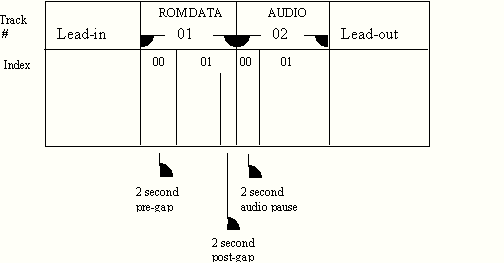
A Mixed Mode CD (see Diagram A) is a CD that contains ROM
data in track 1 and is followed by up to 98 audio tracks. A ROM
drive will play a disc’s first track which in this case
contains ROM data. Appropriate software drivers and/ or software
may be required on a computer to play the remaining audio
tracks. Audio players are capable of playing the audio tracks.
Audio players also have access to the first track that contains
ROM data. If the audio player is not capable of muting the ROM
track when it is attempting to play, a blast of static sound
will most probably occur and cause severe speaker damage.
Advantages
The audio tracks are playable on an audio player. The ROM
track is fully compatible with ROM drives. The audio portion may
be played on ROM drives as well with the appropriate software.
Disadvantages
When the ROM track (track 1) is played on a non-muting audio
player, full volume static will be heard which can be
damaging to audio equipment. To prevent this, you must
immediately skip to track 2 which starts the audio tracks.
Diagram A: Mixed Mode Layout
Hidden Track
This is a non-standard format developed to compensate
for the non-muting audio players that would play a ROM track as
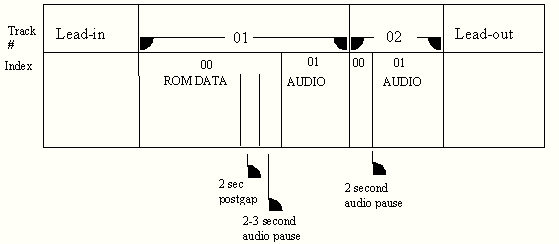
full static. The Hidden Track formatted disc (see Diagram B) is
designed to play in a ROM or audio player. The ROM data is
contained in Track 1, index 0 and the audio tracks begin at
Track 1, index 1. Most audio players initialize at Track 1,
index 1, so the ROM track is "hidden" to the audio
player. ROM drives, with the appropriate software drivers
installed, can access the ROM track from index 0 of track 1.
An audio track can also be placed in index 0 of track 1. This
format allows the consumer to "back-up" or rewind into
the hidden track on the audio player and listen to the audio
track. This hidden audio track will not be played automatically
by the audio player when the disc is inserted. If the audio
player allows you to back-up into index 0 of track 1 and it
contains ROM data, this may result in the full volume static
problem described in Mixed Mode CD section of this paper. The blast of static could be
damaging to audio equipment.
Advantages
Audio players will play the audio tracks. Most non-muting
audio players will not play the ROM data as full static. The ROM
track can be played on most Macs and Windows 3.1 PCs with the
appropriate software drivers installed.
Disadvantages
Most Macs do not need additional software to read this format
but Windows 3.1 PCs may need software driver upgrades. More
recent Windows 95 drivers do not allow access to Track 1, Index
0 because Microsoft supports another Enhanced CD format. Some
audio systems allow the consumer to rewind or back up into the
ROM data giving the opportunity to play the full static which
can damage speakers. Because Hidden Track is non-standard,
CD-Rs cannot be made. Replicated disc samples are required as
proof discs for customers, making premastering more expensive
than other options.
Diagram B: Hidden Track Layout
Stamped Multisession (CD Extra)
Stamped Multisession is a format that solves the problem of
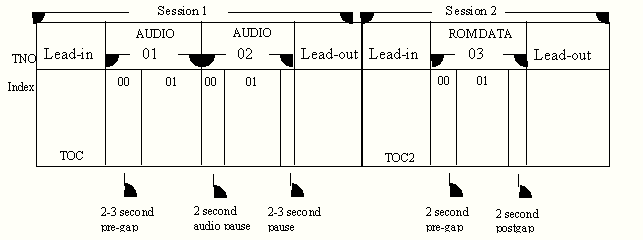
having ROM data in Track 1. There are two sessions on a disc
where audio is contained in session 1 and ROM data is contained
in session 2 (see Diagram C). Audio players only see what is in
session 1, thus solving the problem of playing full volume
static on some audio players. Multisession hardware and software
drivers are required on a PC to access the ROM data in the
second session.
There is a Yellow Book multisession specification and another
specification known as the Blue Book which covers CD Extra. CD Extra achieves the same as the Yellow Book multisession
specification except that it requires special software for
premastering and the payment of royalties since it is a
Sony/Philips proprietary format. Microsoft supports the CD Extra
Blue Book format with its Windows 95 operating system.
Advantages
Audio players cannot access the ROM data so the playing of
full static is not an issue. Audio players can access the audio
tracks like any Red Book audio disc.
Disadvantages
Multisession capable hardware and software must be installed
on the computer to access the ROM data. Most drives made before
1995 are not multisession capable. Older operating systems, like
Microsoft’s Windows 3.1, may not have multisession capable
drivers available.
Diagram C: Multisession & "CD
Extra" Layout
(Only two (2) sessions are shown in this
example)
CD-I
Compact Disc Interactive (CD-I) is a proprietary format
developed by Philips for consumer use on CD-I players. The CD-I
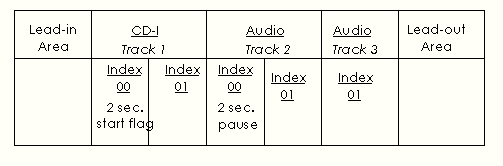
format (See Diagram D) is defined in the industry standard Green
Book. The CD-I disc is composed of a CD-I track or tracks and
may be followed by one or more CD-DA (Compact Disc Digital
Audio) tracks. The first track on a CD-I disc must be a CD-I
track. All other tracks may be used for CD-I tracks or CD-DA
tracks.
CD-I players connect to your television set in a manner
closely resembling the connection of a VCR (Video Cassette
Recorder). CD-I applications vary but include developed titles
for education, training, video, games, and other areas of
interest where you need to present video, graphics, text and
audio to a consumer audience having access to a TV and CD-I
player. You must obtain appropriate authoring software if you
wish to build a CD-I disc.
Advantages
The audio tracks on a CD-I will play in an audio player. CD-I
players will plug into virtually any television set any where in
the world; this is a world-wide standard.
Disadvantages
The first track will be a data track. This track must be
skipped in order to play the audio on an audio player. If the
player does not mute the data track, the speakers could
be damaged.
Diagram D: CD-I Layout
CD+G (CD + Graphics)
This is a standard audio disc that contains a limited amount
of graphics in defined subcode channels. This disc works in all
audio players but the graphics portion is only available in a
special CD+G or Karaoke player.
Advantages
A CD+G CD can be sold as a basic audio CD with the added
features of having displayable graphics that can be viewed with
the appropriate equipment.
Disadvantages
CD+G graphics can only be viewed with a CD+G compatible
player. A CD+G disc must be created with special authoring
software. Only a very small amount of data can be stored as
graphics in the appropriate subcode channels.
Conclusion
As you may now conclude, the basic Compact Disc format
developed by Philips and Sony allows for tremendous variation,
thus creating opportunity to use this durable and versatile
medium for innumerable formats and platforms. Whatever your
Compact Disc application, there are format choices currently
available and more are being developed. As the industry evolves,
some formats will become dominant in the market while others may
have only limited value.
As the largest independent Compact Disc manufacturer in the
World, Cinram leads the industry in cutting edge optical
technology. As new formats are developed, Cinram provides
technical expertise in all aspects of the Compact Disc
manufacturing processes to our customers. Cinram has three
manufacturing plants in the US: Huntsville, AL, Anaheim, CA, and
Richmond, IN. Additional reference material can be found in
Cinram’s Compact Disc Terminology paper. Copies of this paper
and others are available at Cinram’s
Web Site.. Please feel free to contact us with any question
that you may have. We look forward to working with you on your
next CD project!
Copyright ©
2002-03 CD Solutions Inc., All Rights Reserved.
Apollo,
Apollo II, Analog to digital, Orbit, Orbit I |